Openai Provider is the focus of this documentation page. Set up OpenAI API key, choose a model, and configure proxy for blocked regions.
OpenAI provides the GPT-5.6 series (Sol, Terra, Luna), earlier GPT-5/4o models, O3 reasoning models, and image generation models (GPT Image 2 and DALL·E) for high-quality content and image creation. This guide covers API key setup, model selection, and proxy configuration.
Getting Your OpenAI API Key
- Go to platform.openai.com.
- Sign up or log in to your account.
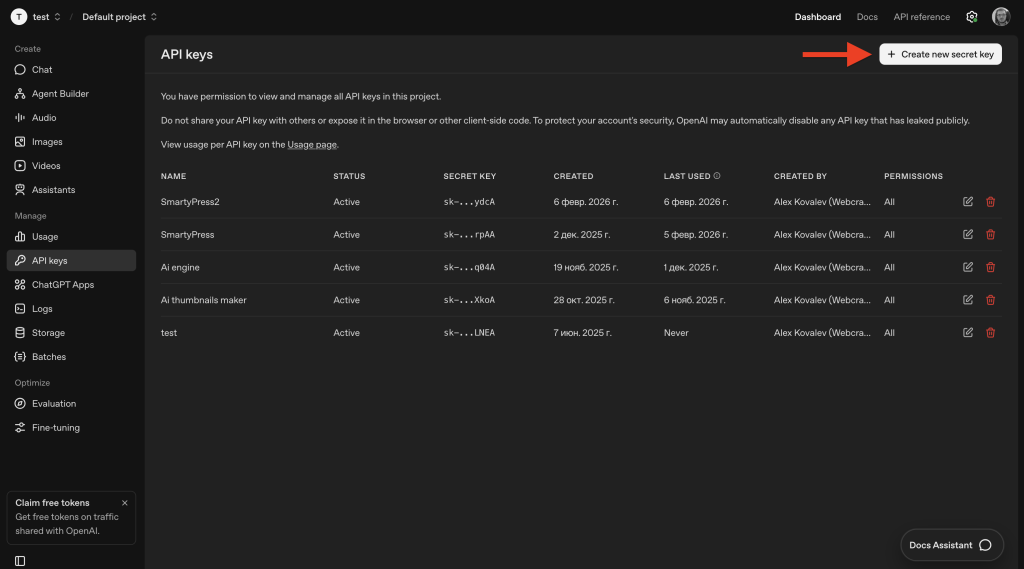
- Navigate to Settings → API Keys (or visit
platform.openai.com/api-keys). - Click “Create new secret key” and give it a name (e.g., “SmartyPress”).
- Copy the key immediately — it starts with
sk-...and is shown only once. - Go to Billing and add at least $5 in credits.
Configuring in SmartyPress
- Go to SmartyPress AI → Settings (
#/settings). - Open the OpenAI provider card.
- Paste your key into the API Key field.
- Optionally enable Use Proxy and enter a Proxy URL if OpenAI is blocked in your region.
- Click Save Provider Settings — SmartyPress saves the credentials and automatically tests the connection (
smartypress/v1/settings/test-provider). There is no separate Test Connection button. - Return to Settings and, under General Settings, choose Default Provider = OpenAI and a Default Model (for example, GPT-4o). Click Save Changes.
Available Text Models
OpenAI text models are a static list shipped with the plugin (not fetched from the OpenAI API at runtime). Current GPT-5.6 models match the lineup on developers.openai.com:
| Model | API ID | Type | Best For |
|---|---|---|---|
| GPT-5.6 Sol | gpt-5.6-sol |
Premium / Reasoning | Flagship for complex reasoning, coding, and professional work |
| GPT-5.6 Terra | gpt-5.6-terra |
Premium / Reasoning | Default plugin model — best balance of intelligence and cost |
| GPT-5.6 Luna | gpt-5.6-luna |
Budget / Reasoning | Cost-sensitive high-volume drafts and bulk generation |
| GPT-5.5 | gpt-5.5 |
Premium / Reasoning | Previous flagship class retained for compatibility |
| GPT-5.4 | gpt-5.4 |
Premium / Reasoning | Affordable coding and professional work |
| GPT-5.4 Mini | gpt-5.4-mini |
Standard / Reasoning | Fast GPT-5.4-class model for high-volume tasks |
| GPT-5.4 Nano | gpt-5.4-nano |
Budget | Cheapest GPT-5.4-class option for simple tasks |
| GPT-5.3 Codex | gpt-5.3-codex |
Premium / Reasoning | Agentic coding and technical workflows |
| GPT-5.2 | gpt-5.2 |
Premium / Reasoning | Earlier GPT-5.x retained for compatibility |
| GPT-5.1 | gpt-5.1 |
Premium | Earlier GPT-5.x retained for compatibility |
| GPT-5 | gpt-5 |
Premium | Earlier GPT-5 line retained for compatibility |
| GPT-4.1 | gpt-4.1 |
Premium | Strong instruction following for general content |
| GPT-4o | gpt-4o |
Standard | Previous multimodal default for everyday tasks |
| GPT-4o Mini | gpt-4o-mini |
Budget | Fast, affordable everyday tasks |
| O3 | o3 |
Reasoning | Specialized reasoning model for complex analysis |
| O3 Mini | o3-mini |
Reasoning | Faster reasoning at lower cost than O3 |
Image Generation Models
Image models are also a static list in the plugin. GPT Image models support generation and editing; DALL·E remains available for compatibility:
| Model | API ID | Type | Best For |
|---|---|---|---|
| GPT Image 2 | gpt-image-2 |
Premium | Default — state-of-the-art image generation and editing |
| GPT Image 1.5 | gpt-image-1.5 |
Premium | Previous GPT Image generation with strong text rendering |
| GPT Image 1 | gpt-image-1 |
Standard | Earlier GPT Image model retained for compatibility |
| GPT Image 1 Mini | gpt-image-1-mini |
Budget | Cost-efficient GPT Image option for simpler visuals |
| DALL-E 3 | dall-e-3 |
Standard | Classic creative image generation from text prompts |
| DALL-E 3 HD | dall-e-3-hd |
Premium | Higher-resolution DALL·E output |
Proxy Support (Blocked Regions)
If OpenAI API is blocked in your region, you can route requests through an HTTP or SOCKS proxy:
- On the OpenAI provider card, enable Use Proxy.
- Enter your Proxy URL in the format shown in Settings (for example,
socks5://USER:PASSWORD@ip:portorhttp://ip:port). - Click Save Provider Settings to save and verify the connection.
Typical Costs
- Title generation: ~$0.001–$0.01
- Full article (500–1000 words): ~$0.02–$0.10
- GPT-4o Mini is approximately 10x cheaper than GPT-4o