Image ALT Generator module creates SEO-friendly ALT text, captions, titles, and descriptions for images in your WordPress Media Library. Process your entire library in bulk or auto-generate metadata when new images are uploaded.
Good ALT text improves accessibility, helps search engines understand your images, and boosts SEO scores. This module uses AI vision models to analyze images and generate accurate, keyword-aware descriptions automatically.
Enabling the Module
- Go to SmartyPress AI → Components (
#/components). - Find Image ALT Generation in the modules list.
- Click Activate if it is disabled (enabled by default).
- A new Image ALT Generation page appears in the SmartyPress AI admin menu at
#/image-alt-generation.
Screen Layout
The page has two tabs and a persistent sidebar:
- Bulk Generation — indexing, filters, image table, and per-row generation
- Upload Settings — auto-generate on Media Library upload
- Generation settings sidebar — vision model, text model, language, and field toggles
Generation Modes
Image analysis is controlled by the Image analysis control in the sidebar:
| Mode | How It Works | Best For |
|---|---|---|
| Enabled (vision, default) | AI vision model analyzes the actual image file, then a text model generates metadata | Standalone images, product photos, screenshots |
| Disabled (context) | AI uses the surrounding post content, filename, and SEO keywords — no image analysis | Images already described by surrounding text, decorative images |
What Gets Generated
In the sidebar under Generation Options, choose which metadata fields to generate:
- Generate ALT — the primary accessibility description (most important for SEO)
- Generate caption — visible caption displayed below the image
- Generate title — the attachment title in WordPress
- Generate description — the full attachment description field
- Use SEO focus keyword context — weave focus keywords from the related post into the metadata
Single Image Generation
- Go to SmartyPress AI → Image ALT Generation (
#/image-alt-generation). - Stay on the Bulk Generation tab.
- Browse, search, or filter your Media Library images.
- In the Actions column, click Generate Metadata for a single image.
- Generated fields are written immediately according to the sidebar options.
Bulk Generation
Process multiple images at once:
- Go to SmartyPress AI → Image ALT Generation.
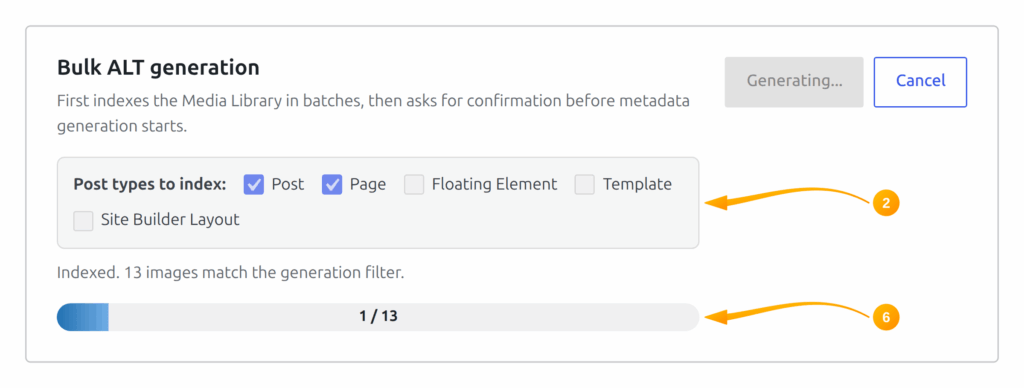
- On the Bulk Generation tab, choose Post types to index.
- Optionally filter the table: All images, Missing ALT, Has ALT, Missing caption, or search by filename/title.
- Click Start bulk generation.
- The module indexes the Media Library first, then asks for confirmation with the matching image count.
- After confirmation, images are processed in batches (batch size 1–5 from the sidebar) with a progress bar.
Auto-Generate on Upload
Enable automatic ALT text generation for every new image uploaded to your site:
- Open the Upload Settings tab.
- Enable Automatically generate ALT when an image is uploaded to Media Library.
- Uploads are queued with WP-Cron so the Media Library request is not blocked by a slow AI provider.
SEO Keyword Integration
The module can incorporate SEO keywords into generated ALT text:
- When Use SEO focus keyword context is enabled, the module reads the focus keyword from the related post (Rank Math, Yoast, AIOSEO, or SmartyPress metadata).
- Keywords are woven naturally into the ALT text — not just prepended or appended.
- Each table row also shows related post context and detected focus keywords when available.
Sidebar Settings
| Setting | Default | Description |
|---|---|---|
| Image analysis | Enabled (vision) | Use a vision model, or disable to generate from post/SEO/filename context only |
| Vision provider / model | (first available) | Provider and model for image analysis |
| Text provider / model | (first available) | Provider and model for final ALT/caption/title/description text |
| Poor context prompt | (built-in template) | Fallback prompt when analysis is disabled and context is weak |
| Language | (site language) | Output language for generated metadata |
| Max ALT length | 125 | Maximum character length for ALT text (40–300) |
| Batch size | 1 | Images per batch in bulk mode (1–5) |
| Generate ALT | On | Generate ALT text for images |
| Generate caption | On | Generate visible captions |
| Generate title | Off | Generate attachment titles |
| Generate description | Off | Generate full descriptions |
| Use SEO focus keyword context | On | Incorporate focus keyword from the related post |
| Auto-generate on Upload | Off | Configured on the Upload Settings tab |